KryptonGallery ✓ LCode 已集成 Ribbon
命名空间:Krypton.Ribbon · 程序集:Krypton.Ribbon.dll
简介
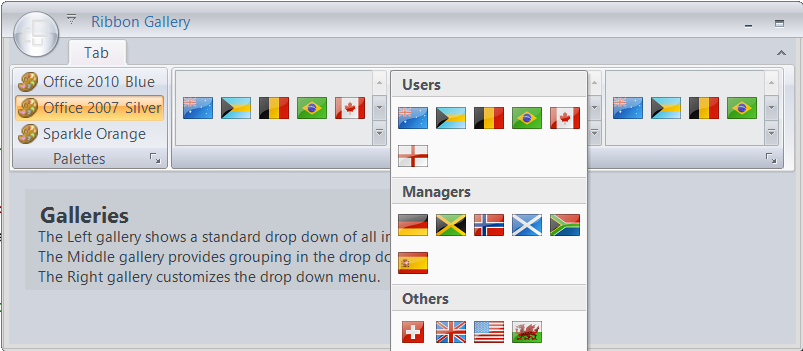
KryptonGallery 是 Ribbon 中的图库控件,以网格形式展示一组可选的图片/样式项(类似 Word 中的「样式库」或「页面颜色」选择器)。它通常嵌入在 RibbonGroup 中,支持展开为下拉弹出面板以显示更多选项。图库项通过 ImageList 提供图像,用户点击某项即触发选中事件。
常用属性
| 属性 | 类型 | 说明 |
|---|---|---|
ImageList | ImageList | 提供图库项图像的 ImageList 控件 |
ItemImageIndex | int | 当前选中项的图像索引 |
ListColumnSize | int | 下拉列表中每行显示的列数 |
DropButtonVisible | bool | 是否显示展开/折叠的下拉按钮 |
Enabled | bool | 图库是否启用 |
Visible | bool | 图库是否可见 |
MinimumVisibleItems | int | Ribbon 收缩时最少显示的项数 |
MaximumVisibleItems | int | Ribbon 展开时最多显示的项数 |
ItemSize | Size | 每个图库项的尺寸 |
常用事件
| 事件 | 说明 |
|---|---|
SelectedIndexChanged | 选中项索引改变时触发 |
GalleryDropMenu | 下拉菜单即将显示时触发(可动态添加菜单项) |
Click | 点击图库项时触发 |
快速上手
在 Ribbon 分组中添加图库
using Krypton.Ribbon;

// 准备 ImageList(包含多个样式缩略图)
var imageList = new ImageList();
imageList.ImageSize = new Size(44, 33);
imageList.Images.Add(Properties.Resources.style_normal);
imageList.Images.Add(Properties.Resources.style_heading1);
imageList.Images.Add(Properties.Resources.style_heading2);
imageList.Images.Add(Properties.Resources.style_title);
imageList.Images.Add(Properties.Resources.style_quote);
imageList.Images.Add(Properties.Resources.style_code);

// 创建图库
var gallery = new RibbonGallery();
gallery.ImageList = imageList;
gallery.ListColumnSize = 3;          // 每行 3 列
gallery.DropButtonVisible = true;    // 显示展开按钮
gallery.ItemImageIndex = 0;          // 默认选中第一项

// 选中事件
gallery.SelectedIndexChanged += (s, e) =>
{
    ApplyStyle(gallery.ItemImageIndex);
};

// 添加到 Ribbon 分组
var groupStyles = new RibbonGroup();
groupStyles.TextLine1 = "样式";
groupStyles.Items.Add(gallery);

var tabHome = new RibbonTab("开始");
tabHome.Groups.Add(groupStyles);
kryptonRibbon1.RibbonTabs.Add(tabHome);
进阶用法
自定义下拉菜单
// 在展开的下拉面板底部添加额外操作
gallery.GalleryDropMenu += (s, e) =>
{
    e.KryptonContextMenu.Items.Add(new KryptonContextMenuSeparator());

    var menuClear = new KryptonContextMenuItem("清除格式");
    menuClear.Click += (ms, me) => ClearFormatting();
    e.KryptonContextMenu.Items.Add(menuClear);

    var menuApplyAll = new KryptonContextMenuItem("应用到所有段落");
    menuApplyAll.Click += (ms, me) => ApplyToAllParagraphs();
    e.KryptonContextMenu.Items.Add(menuApplyAll);
};
动态更新图库内容
// 运行时更换 ImageList
var newImages = new ImageList();
newImages.ImageSize = new Size(60, 40);
foreach (var theme in GetAvailableThemes())
{
    newImages.Images.Add(theme.Thumbnail);
}
gallery.ImageList = newImages;
gallery.ItemImageIndex = 0;

// 调整列数以适配新尺寸
gallery.ListColumnSize = 2;
控制 Ribbon 收缩时的显示
// Ribbon 宽度不足时,图库会收缩显示
// 设置最少/最多可见项数来控制收缩行为
gallery.MinimumVisibleItems = 2;   // 最少显示 2 项
gallery.MaximumVisibleItems = 8;   // 最多显示 8 项
提示:KryptonGallery 的图像来源于 ImageList 控件。在设计器中,先添加一个 ImageList 并填充图片,然后将 Gallery 的
ImageList 属性指向该 ImageList。ListColumnSize 控制下拉展开时的列数,而 Ribbon 内嵌显示时的列数由可用宽度自动决定。
对应示例项目
📁 Source/Krypton Ribbon Examples/Ribbon Gallery/
演示图库控件的完整用法,包括:ImageList 绑定、列数配置、下拉菜单自定义、选中事件处理。