KryptonTaskDialog ⚠ LCode 未集成 对话框
命名空间:Krypton.Toolkit · 程序集:Krypton.Toolkit.dll
注意:此控件尚未被 LCode 工具箱集成。如需使用,请通过 NuGet 安装 Krypton.Toolkit 包并在代码中手动创建实例。
简介
KryptonTaskDialog 是类似 Windows 原生 TaskDialog 的增强型任务对话框,提供比普通 MessageBox 更丰富的信息展示能力。它支持主指令文字、扩展内容、命令链接按钮、单选按钮、复选框、进度条、页脚超链接等元素,适用于需要向用户展示复杂信息或提供多种操作选择的场景。
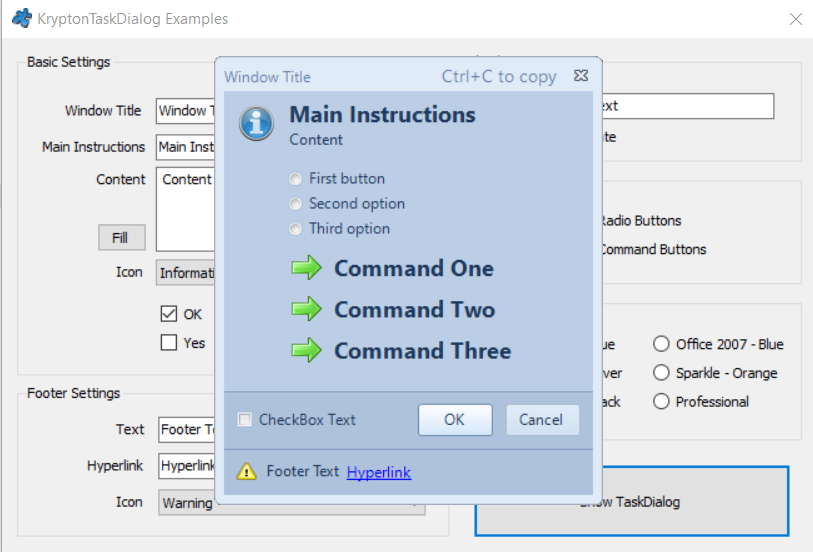
常用属性
| 属性 | 类型 | 说明 |
|---|---|---|
WindowTitle | string | 对话框标题栏文字 |
MainInstruction | string | 主指令文字(大号加粗显示) |
Content | string | 主要内容文字(详细说明) |
MainIcon | TaskDialogIcon | 主图标(Information / Warning / Error / Shield) |
CommonButtons | TaskDialogCommonButtons | 通用按钮组合(OK / YesNo / OKCancel 等) |
CustomButtons | 集合 | 自定义命令链接按钮集合 |
RadioButtons | 集合 | 单选按钮集合 |
VerificationText | string | 底部复选框文字(为空则不显示) |
ExpandedInformation | string | 可展开的附加信息 |
FooterText | string | 页脚文字(支持超链接) |
ProgressBar | TaskDialogProgressBar | 进度条(用于长时间操作反馈) |
DefaultButton | int | 默认按钮 ID |
快速上手
基本用法
using Krypton.Toolkit;

// 创建任务对话框
var taskDialog = new KryptonTaskDialog();
taskDialog.WindowTitle = "应用程序错误";
taskDialog.MainInstruction = "发生了未处理的异常";
taskDialog.Content = "程序遇到了一个问题,需要关闭。\n" +
    "您的工作可能已保存为自动恢复文件。";
taskDialog.MainIcon = TaskDialogIcon.Error;
taskDialog.CommonButtons = TaskDialogCommonButtons.OK;
taskDialog.ExpandedInformation = "异常详情:\n" +
    "System.NullReferenceException: Object reference not set...";
taskDialog.FooterText = "<a href=\"https://example.com/report\">报告此问题</a>";

taskDialog.ShowDialog(this);
带命令链接按钮
var taskDialog = new KryptonTaskDialog();
taskDialog.WindowTitle = "保存更改";
taskDialog.MainInstruction = "是否保存对文档的更改?";
taskDialog.Content = "如果不保存,您的更改将会丢失。";
taskDialog.MainIcon = TaskDialogIcon.Warning;

// 添加命令链接按钮
taskDialog.CustomButtons.Add(new KryptonTaskDialogCommandButton(
    "保存并关闭", "保存当前文档的所有更改"));
taskDialog.CustomButtons.Add(new KryptonTaskDialogCommandButton(
    "不保存", "放弃所有未保存的更改"));
taskDialog.CustomButtons.Add(new KryptonTaskDialogCommandButton(
    "取消", "返回编辑器继续工作"));

var result = taskDialog.ShowDialog(this);

switch (result)
{
    case 100: SaveAndClose(); break;
    case 101: CloseWithoutSaving(); break;
    case 102: /* 取消,不做操作 */ break;
}
进阶用法
带进度条的操作确认
// 删除确认 + 进度反馈
var taskDialog = new KryptonTaskDialog();
taskDialog.WindowTitle = "删除文件";
taskDialog.MainInstruction = $"确定要删除 {selectedFiles.Count} 个文件吗?";
taskDialog.Content = "此操作不可撤销,文件将被永久删除。";
taskDialog.MainIcon = TaskDialogIcon.Shield;
taskDialog.CommonButtons = TaskDialogCommonButtons.YesNo;
taskDialog.VerificationText = "同时删除回收站中的副本";
taskDialog.DefaultButton = (int)DialogResult.No;

if (taskDialog.ShowDialog(this) == DialogResult.Yes)
{
    bool deleteFromRecycleBin = taskDialog.VerificationChecked;
    DeleteFiles(selectedFiles, deleteFromRecycleBin);
}
单选按钮选择操作
var taskDialog = new KryptonTaskDialog();
taskDialog.WindowTitle = "冲突解决";
taskDialog.MainInstruction = "检测到文件冲突";
taskDialog.Content = "目标位置已存在同名文件,请选择处理方式:";
taskDialog.MainIcon = TaskDialogIcon.Information;

// 添加单选按钮
taskDialog.RadioButtons.Add(new KryptonTaskDialogRadioButton("覆盖现有文件"));
taskDialog.RadioButtons.Add(new KryptonTaskDialogRadioButton("跳过此文件"));
taskDialog.RadioButtons.Add(new KryptonTaskDialogRadioButton("保留两者(重命名新文件)"));

taskDialog.CommonButtons = TaskDialogCommonButtons.OKCancel;

if (taskDialog.ShowDialog(this) == DialogResult.OK)
{
    switch (taskDialog.RadioButtonResult)
    {
        case 200: ResolveConflict(ConflictAction.Overwrite); break;
        case 201: ResolveConflict(ConflictAction.Skip); break;
        case 202: ResolveConflict(ConflictAction.Rename); break;
    }
}
提示:KryptonTaskDialog 的自定义按钮 ID 从 100 开始递增,单选按钮 ID 从 200 开始递增。命令链接按钮适合展示 2~5 个带说明的操作选项,比传统按钮更直观。
对应示例项目
📁 Source/Krypton Toolkit Examples/KryptonTaskDialog Examples/
包含:基本任务对话框、命令链接按钮、进度条、单选按钮、展开信息演示。