KryptonLinkLabel ✓ LCode 已集成 Toolkit
命名空间:Krypton.Toolkit · 程序集:Krypton.Toolkit.dll
简介
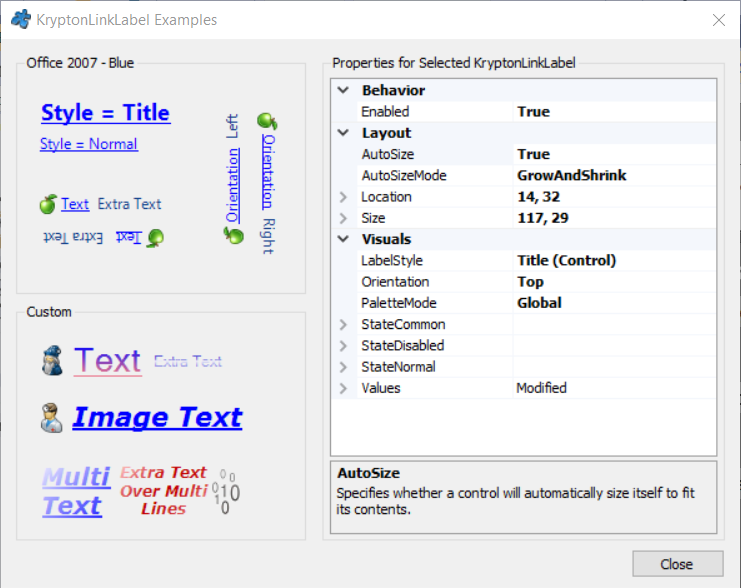
KryptonLinkLabel 是链接标签控件,外观为带下划线的可点击文字,类似网页超链接。点击时触发 LinkClicked 事件,常用于打开网址、跳转到帮助文档、触发"查看更多"等导航操作。它跟随 Krypton 主题渲染,并支持自定义悬停 / 已访问状态的颜色。
常用属性
| 属性 | 类型 | 说明 |
|---|---|---|
Values.Text | string | 链接显示的文字 |
Values.Image | Image | 文字旁的图标 |
LabelStyle | LabelStyle | 标签风格 |
StateCommon.ShortText.Font | Font | 链接文字字体 |
StateNormal.ShortText.Color1 | Color | 正常状态链接颜色 |
StateTracking.ShortText.Color1 | Color | 鼠标悬停时颜色 |
StatePressed.ShortText.Color1 | Color | 按下时颜色 |
StateDisabled.ShortText.Color1 | Color | 禁用状态颜色 |
AutoSize | bool | 是否根据内容自动调整大小 |
KryptonCommand | KryptonCommand | 绑定的命令对象 |
快速上手
基本用法(打开网址)
using Krypton.Toolkit;
using System.Diagnostics;

// 创建链接标签
var lnkHome = new KryptonLinkLabel();
lnkHome.Values.Text = "访问官方网站";
lnkHome.Location = new Point(20, 20);
lnkHome.AutoSize = true;

// 点击时打开浏览器
lnkHome.LinkClicked += (s, e) =>
{
    Process.Start(new ProcessStartInfo
    {
        FileName = "https://github.com/Krypton-Suite",
        UseShellExecute = true
    });
};

this.Controls.Add(lnkHome);
触发应用内导航
var lnkHelp = new KryptonLinkLabel();
lnkHelp.Values.Text = "查看帮助文档";
lnkHelp.Values.Image = Properties.Resources.icon_help;

lnkHelp.LinkClicked += (s, e) =>
{
    // 切换到帮助页或打开帮助窗口
    ShowHelpPage("getting-started");
};

// "查看更多"折叠展开
var lnkMore = new KryptonLinkLabel();
lnkMore.Values.Text = "显示更多选项 ▼";
lnkMore.LinkClicked += (s, e) =>
{
    panelAdvanced.Visible = !panelAdvanced.Visible;
    lnkMore.Values.Text = panelAdvanced.Visible
        ? "收起选项 ▲"
        : "显示更多选项 ▼";
};
进阶用法
自定义链接颜色
// 使用翡翠绿作为链接主色
lnkHome.StateNormal.ShortText.Color1 = Color.FromArgb(15, 118, 110);
lnkHome.StateTracking.ShortText.Color1 = Color.FromArgb(13, 148, 136);
lnkHome.StatePressed.ShortText.Color1 = Color.FromArgb(17, 94, 89);

// 悬停时加下划线效果(通过字体)
lnkHome.StateTracking.ShortText.Font =
    new Font("Microsoft YaHei UI", 9f, FontStyle.Underline);
禁用与条件状态
// 未登录时禁用"个人中心"链接
var lnkProfile = new KryptonLinkLabel();
lnkProfile.Values.Text = "进入个人中心";
lnkProfile.Enabled = Session.IsLoggedIn;

Session.LoginStateChanged += (s, e) =>
{
    lnkProfile.Enabled = Session.IsLoggedIn;
    lnkProfile.Values.Text = Session.IsLoggedIn
        ? $"欢迎,{Session.UserName}"
        : "请先登录";
};
提示:KryptonLinkLabel 的点击事件是
LinkClicked 而非 Click。如果需要打开网址,请配合 Process.Start 并设置 UseShellExecute = true(.NET Core/.NET 5+ 必需,.NET Framework 4.8 可直接传 URL)。
对应示例项目
📁 Source/Krypton Toolkit Examples/KryptonLinkLabel Examples/
包含:打开网址、应用内导航、自定义颜色、折叠展开演示。