KryptonDateTimePicker ✓ LCode 已集成 Toolkit
命名空间:Krypton.Toolkit · 程序集:Krypton.Toolkit.dll
简介
KryptonDateTimePicker 是增强型日期时间选择器控件,替代标准 System.Windows.Forms.DateTimePicker。它以下拉月历或上下箭头方式选择日期/时间,支持自定义显示格式、仅选时间模式、可选复选框(允许「未填写」状态),是表单中日期录入的标准控件。
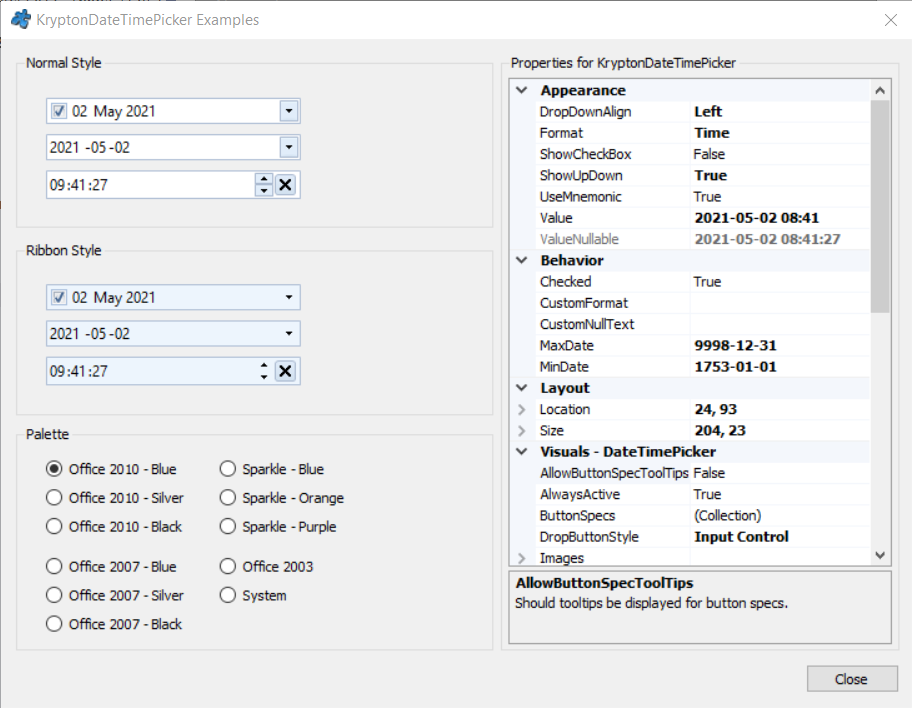
常用属性
| 属性 | 类型 | 说明 |
|---|---|---|
Value | DateTime | 当前选中的日期时间 |
MinDate | DateTime | 允许选择的最早日期 |
MaxDate | DateTime | 允许选择的最晚日期 |
Format | DateTimePickerFormat | 显示格式(Long / Short / Time / Custom) |
CustomFormat | string | 自定义格式串(Format 为 Custom 时生效) |
ShowUpDown | bool | 用上下箭头代替下拉日历 |
ShowCheckBox | bool | 显示勾选框(未勾选表示未选择日期) |
Checked | bool | 勾选框状态(配合 ShowCheckBox 使用) |
CalendarTodayDate | DateTime | 日历中「今天」的标记日期 |
StateCommon.Back.Color1 | Color | 控件背景色 |
StateCommon.Border.Color1 | Color | 边框颜色 |
StateCommon.Content.Color1 | Color | 日期文字颜色 |
快速上手
基本用法
using Krypton.Toolkit;

var dtpBirthday = new KryptonDateTimePicker();
dtpBirthday.Location = new Point(16, 16);
dtpBirthday.Size = new Size(180, 26);
dtpBirthday.Format = DateTimePickerFormat.Short;  // 短日期,如 2026/7/31
dtpBirthday.Value = DateTime.Today;

// 日期改变事件
dtpBirthday.ValueChanged += (s, e) =>
    Console.WriteLine($"选中:{dtpBirthday.Value:yyyy-MM-dd}");

this.Controls.Add(dtpBirthday);
自定义格式与范围
dtpBirthday.Format = DateTimePickerFormat.Custom;
dtpBirthday.CustomFormat = "yyyy 年 MM 月 dd 日";

// 限制可选范围
dtpBirthday.MinDate = new DateTime(1900, 1, 1);
dtpBirthday.MaxDate = DateTime.Today;
进阶用法
纯时间选择
var dtpTime = new KryptonDateTimePicker();
dtpTime.Format = DateTimePickerFormat.Custom;
dtpTime.CustomFormat = "HH:mm";   // 只显示时分
dtpTime.ShowUpDown = true;        // 用上下箭头调整
dtpTime.Value = DateTime.Today.AddHours(9);  // 09:00
可选日期(允许为空)
dtpBirthday.ShowCheckBox = true;  // 显示勾选框
dtpBirthday.Checked = false;      // 初始未选择

// 读取时先判断勾选状态
DateTime? birthday = dtpBirthday.Checked
    ? (DateTime?)dtpBirthday.Value
    : null;

if (birthday == null)
    Console.WriteLine("未填写生日");
提示:需要一次性展示整月日历(如排班、预订界面)时,请使用 KryptonMonthCalendar;DateTimePicker 更适合表单中的单值录入。
对应示例项目
📁 Source/Krypton Toolkit Examples/KryptonDateTimePicker Examples/
包含:日期/时间格式、范围限制、可选复选框演示。