KryptonCheckBox ✓ LCode 已集成 Toolkit
命名空间:Krypton.Toolkit · 程序集:Krypton.Toolkit.dll
简介
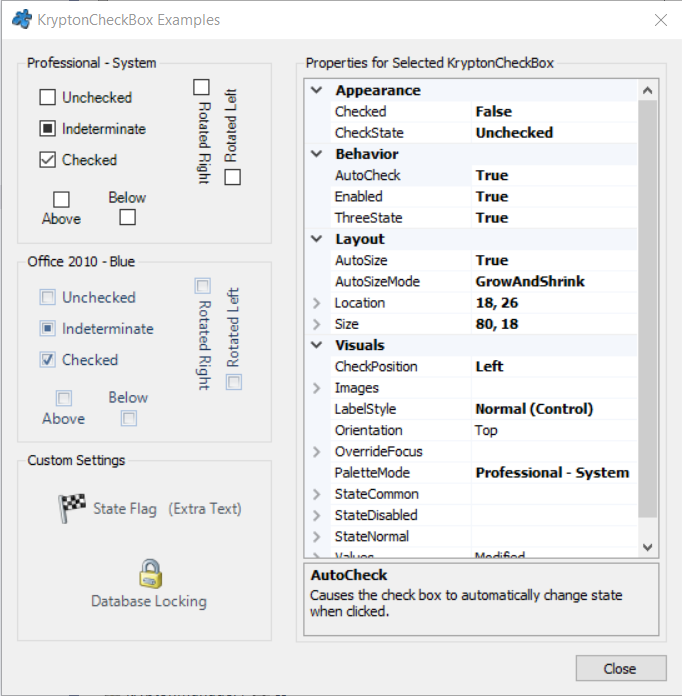
KryptonCheckBox 是增强型复选框控件,替代标准 System.Windows.Forms.CheckBox。它跟随 Krypton 主题渲染勾选框和文字,支持三态(选中 / 未选中 / 不确定)模式,以及自定义各状态外观。常用于多选设置、权限勾选、过滤条件等场景。
常用属性
| 属性 | 类型 | 说明 |
|---|---|---|
Values.Text | string | 复选框旁的文字 |
Checked | bool | 是否选中 |
CheckState | CheckState | 勾选状态(Unchecked / Checked / Indeterminate) |
ThreeState | bool | 是否启用三态模式 |
AutoCheck | bool | 点击时是否自动切换状态 |
LabelStyle | LabelStyle | 文字标签风格 |
StateCommon.ShortText.Font | Font | 文字字体 |
StateCommon.ShortText.Color1 | Color | 文字颜色 |
StateDisabled.ShortText.Color1 | Color | 禁用时文字颜色 |
CheckedIndicatorStyle | IndicatorStyle | 勾选框指示器风格 |
快速上手
基本用法(多选设置)
using Krypton.Toolkit;

// 创建复选框
var chkAutoSave = new KryptonCheckBox();
chkAutoSave.Values.Text = "启用自动保存";
chkAutoSave.Checked = true;
chkAutoSave.Location = new Point(20, 20);
chkAutoSave.AutoSize = true;

// 状态变化事件
chkAutoSave.CheckedChanged += (s, e) =>
{
    Settings.AutoSaveEnabled = chkAutoSave.Checked;
    Settings.Save();
};

this.Controls.Add(chkAutoSave);
三态复选框(全选 / 部分选)
// 父级"全选"复选框(三态)
var chkAll = new KryptonCheckBox();
chkAll.Values.Text = "全选";
chkAll.ThreeState = true;
chkAll.CheckState = CheckState.Indeterminate;

// 子项复选框
var chkEmail = new KryptonCheckBox { Values = { Text = "邮件通知" } };
var chkSms = new KryptonCheckBox { Values = { Text = "短信通知" } };
var chkPush = new KryptonCheckBox { Values = { Text = "推送通知" } };

// 子项变化时更新父级三态
EventHandler updateParent = (s, e) =>
{
    var children = new[] { chkEmail, chkSms, chkPush };
    int checkedCount = children.Count(c => c.Checked);

    if (checkedCount == 0)
        chkAll.CheckState = CheckState.Unchecked;
    else if (checkedCount == children.Length)
        chkAll.CheckState = CheckState.Checked;
    else
        chkAll.CheckState = CheckState.Indeterminate;
};

chkEmail.CheckedChanged += updateParent;
chkSms.CheckedChanged += updateParent;
chkPush.CheckedChanged += updateParent;
进阶用法
自定义外观
// 翡翠绿主题文字
chkAutoSave.StateCommon.ShortText.Font =
    new Font("Microsoft YaHei UI", 10f);
chkAutoSave.StateCommon.ShortText.Color1 = Color.FromArgb(55, 65, 81);

// 禁用时灰色
chkAutoSave.StateDisabled.ShortText.Color1 = Color.FromArgb(156, 163, 175);
动态创建复选框列表
// 根据权限列表动态生成
var permissions = GetAvailablePermissions();
int y = 60;

foreach (var perm in permissions)
{
    var chk = new KryptonCheckBox();
    chk.Values.Text = perm.DisplayName;
    chk.Checked = perm.IsEnabled;
    chk.Tag = perm.Id;
    chk.Location = new Point(30, y);
    chk.AutoSize = true;
    chk.CheckedChanged += (s, e) =>
    {
        var id = (string)((KryptonCheckBox)s).Tag;
        SetPermission(id, ((KryptonCheckBox)s).Checked);
    };
    this.Controls.Add(chk);
    y += 30;
}
提示:三态复选框需先设置
ThreeState = true,然后通过 CheckState 属性控制三种状态。读取状态时建议用 CheckState 而非 Checked,因为 Indeterminate 状态下 Checked 也返回 true。
对应示例项目
📁 Source/Krypton Toolkit Examples/KryptonCheckBox Examples/
包含:基本复选框、三态全选、动态列表、自定义外观演示。