KryptonInputBox ✓ LCode 已集成 对话框
命名空间:Krypton.Toolkit · 程序集:Krypton.Toolkit.dll
简介
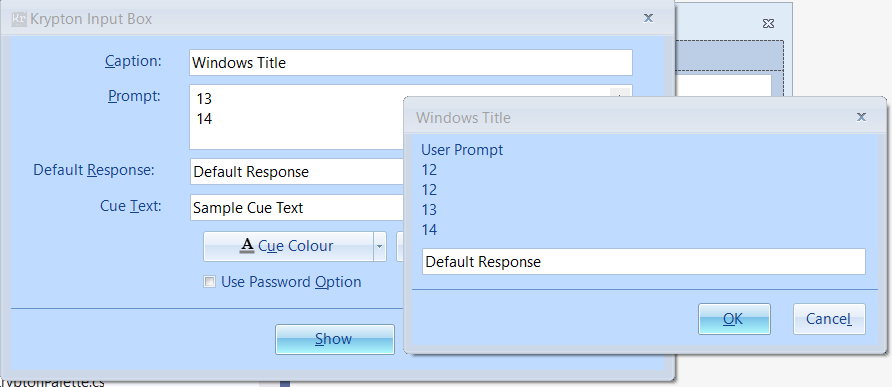
KryptonInputBox 是增强型输入对话框,通过静态方法调用,用于快速向用户收集单个文本输入。它自动跟随 Krypton 主题渲染,提供提示文字、默认值、标题等参数,返回用户输入的字符串(取消时返回 null),是轻量级用户输入收集的最佳选择。
常用方法
| 方法 | 返回类型 | 说明 |
|---|---|---|
Show(string prompt, string caption) | string | 显示输入框,返回用户输入(取消返回 null) |
Show(string prompt, string caption, string defaultValue) | string | 带默认值的输入框 |
Show(string prompt, string caption, string defaultValue, int x, int y) | string | 指定屏幕位置的输入框 |
Show(IWin32Window owner, string prompt, string caption) | string | 指定父窗体的输入框 |
Show(IWin32Window owner, string prompt, string caption, string defaultValue) | string | 指定父窗体 + 默认值 |
Show(IWin32Window owner, string prompt, string caption, string defaultValue, int x, int y) | string | 完整参数版本 |
快速上手
基本用法
using Krypton.Toolkit;

// 简单输入框
string name = KryptonInputBox.Show(
    "请输入您的姓名:",
    "用户信息");

if (name != null)
{
    KryptonMessageBox.Show($"您好,{name}!", "欢迎");
}
带默认值的输入框
// 带默认值,用户可直接确认或修改
string projectName = KryptonInputBox.Show(
    "请输入项目名称:",
    "新建项目",
    "MyProject");

if (!string.IsNullOrWhiteSpace(projectName))
{
    CreateProject(projectName);
}
进阶用法
输入验证循环
// 循环直到用户输入有效值或取消
string email = null;
while (true)
{
    email = KryptonInputBox.Show(
        this,
        "请输入有效的邮箱地址:",
        "邮箱设置",
        email ?? "");

    if (email == null)
        break;  // 用户取消

    if (IsValidEmail(email))
        break;  // 输入有效

    KryptonMessageBox.Show(
        this,
        "邮箱格式不正确,请重新输入。",
        "输入错误",
        MessageBoxButtons.OK,
        MessageBoxIcon.Warning);
}

if (email != null)
{
    SaveEmail(email);
}
重命名操作
// 文件/项目重命名场景
private void RenameItem(string currentName)
{
    string newName = KryptonInputBox.Show(
        this,
        "请输入新名称:",
        "重命名",
        currentName);

    if (newName != null && newName != currentName)
    {
        if (string.IsNullOrWhiteSpace(newName))
        {
            KryptonMessageBox.Show("名称不能为空。", "错误",
                MessageBoxButtons.OK, MessageBoxIcon.Error);
            return;
        }

        if (ItemExists(newName))
        {
            KryptonMessageBox.Show($"名称 \"{newName}\" 已存在。", "冲突",
                MessageBoxButtons.OK, MessageBoxIcon.Warning);
            return;
        }

        PerformRename(currentName, newName);
    }
}
提示:KryptonInputBox 返回
null 表示用户点击了取消或关闭了对话框,返回空字符串表示用户清空了输入后点击确定。判断时应区分这两种情况。
对应示例项目
📁 Source/Krypton Toolkit Examples/KryptonInputBox Examples/
包含:基本输入、默认值、输入验证循环、重命名场景演示。