KryptonPanel ✓ LCode 已集成 Toolkit
命名空间:Krypton.Toolkit · 程序集:Krypton.Toolkit.dll
简介
KryptonPanel 是增强型面板容器控件,替代标准 System.Windows.Forms.Panel。它自动跟随 Krypton 主题渲染背景和边框,支持多种预设背景风格(PanelClient / PanelAlternate / PanelRibbonInset 等),常用于窗体分区布局、工具栏承载区域以及需要统一主题底色的容器场景。
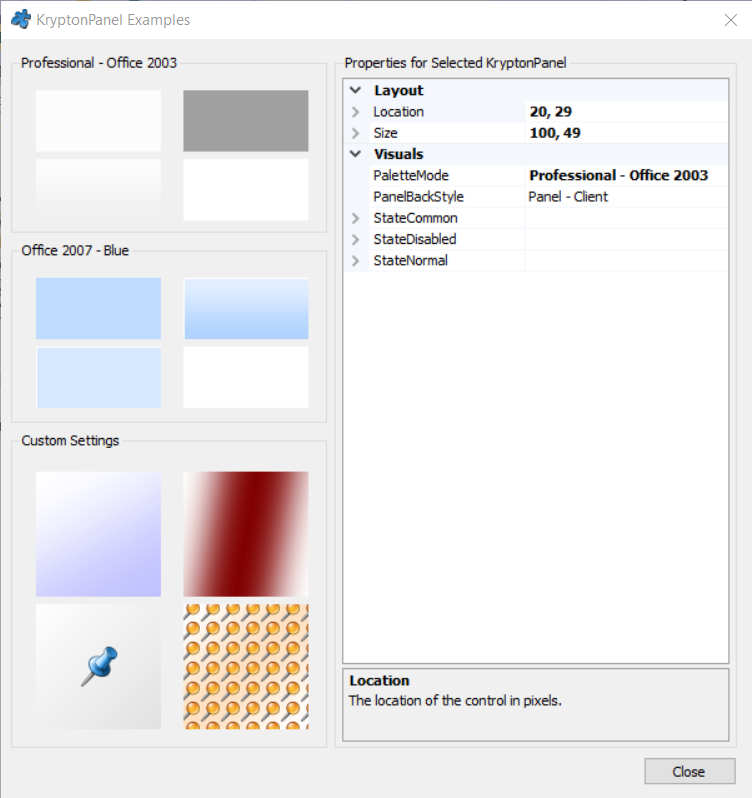
常用属性
| 属性 | 类型 | 说明 |
|---|---|---|
BackStyle | PaletteBackStyle | 背景预设风格(PanelClient / PanelAlternate / PanelRibbonInset 等) |
StateCommon.Back.Color1 | Color | 背景主色 |
StateCommon.Back.Color2 | Color | 背景辅色(渐变时使用) |
StateCommon.Back.ColorStyle | PaletteColorStyle | 背景填充方式(Solid / Linear / Glass 等) |
StateCommon.Border.Color1 | Color | 边框颜色 |
StateCommon.Border.Width | int | 边框宽度(-1 表示使用主题默认值) |
StateCommon.Border.Draw | InheritBool | 是否绘制边框 |
Dock | DockStyle | 停靠方式(Top / Bottom / Fill 等) |
AutoScroll | bool | 子控件超出范围时是否自动显示滚动条 |
Controls | 集合 | 承载的子控件集合 |
KryptonContextMenu | KryptonContextMenu | 关联的右键菜单 |
快速上手
作为窗体底部承载区
using Krypton.Toolkit;

// 创建底部面板
var panelBottom = new KryptonPanel();
panelBottom.Dock = DockStyle.Bottom;
panelBottom.Height = 36;

// 放置一个状态标签
var lblStatus = new KryptonLabel();
lblStatus.Values.Text = "就绪";
lblStatus.Location = new Point(8, 8);
panelBottom.Controls.Add(lblStatus);

this.Controls.Add(panelBottom);
切换背景风格
// 使用交替面板风格(通常带浅色底纹)
panelBottom.BackStyle = PaletteBackStyle.PanelAlternate;

// 或使用 Ribbon 内嵌风格
panelBottom.BackStyle = PaletteBackStyle.PanelRibbonInset;
进阶用法
自定义渐变背景
// 从浅到深的线性渐变
panelBottom.StateCommon.Back.ColorStyle = PaletteColorStyle.Linear;
panelBottom.StateCommon.Back.Color1 = Color.FromArgb(240, 253, 244);
panelBottom.StateCommon.Back.Color2 = Color.FromArgb(204, 251, 241);
panelBottom.StateCommon.Back.Angle = 90;  // 渐变角度

// 绘制 1 像素边框
panelBottom.StateCommon.Border.Draw = InheritBool.True;
panelBottom.StateCommon.Border.Width = 1;
panelBottom.StateCommon.Border.Color1 = Color.FromArgb(15, 118, 110);
配合 Dock 做三栏布局
var panelTop = new KryptonPanel { Dock = DockStyle.Top, Height = 48 };
var panelLeft = new KryptonPanel { Dock = DockStyle.Left, Width = 220 };
var panelContent = new KryptonPanel { Dock = DockStyle.Fill };

// 注意添加顺序:Fill 应最先添加,Top/Left 后添加才能正确停靠
this.Controls.Add(panelContent);
this.Controls.Add(panelLeft);
this.Controls.Add(panelTop);
提示:KryptonPanel 本身不提供标题栏,若需要带标题头的容器请使用 KryptonHeaderGroup;若需要带边框和标题的分组请使用 KryptonGroupBox。
对应示例项目
📁 Source/Krypton Toolkit Examples/KryptonPanel Examples/
包含:各种 BackStyle 背景风格对比、面板停靠布局演示。