KryptonOpenFileDialog ✓ LCode 已集成 对话框
命名空间:Krypton.Toolkit · 程序集:Krypton.Toolkit.dll
简介
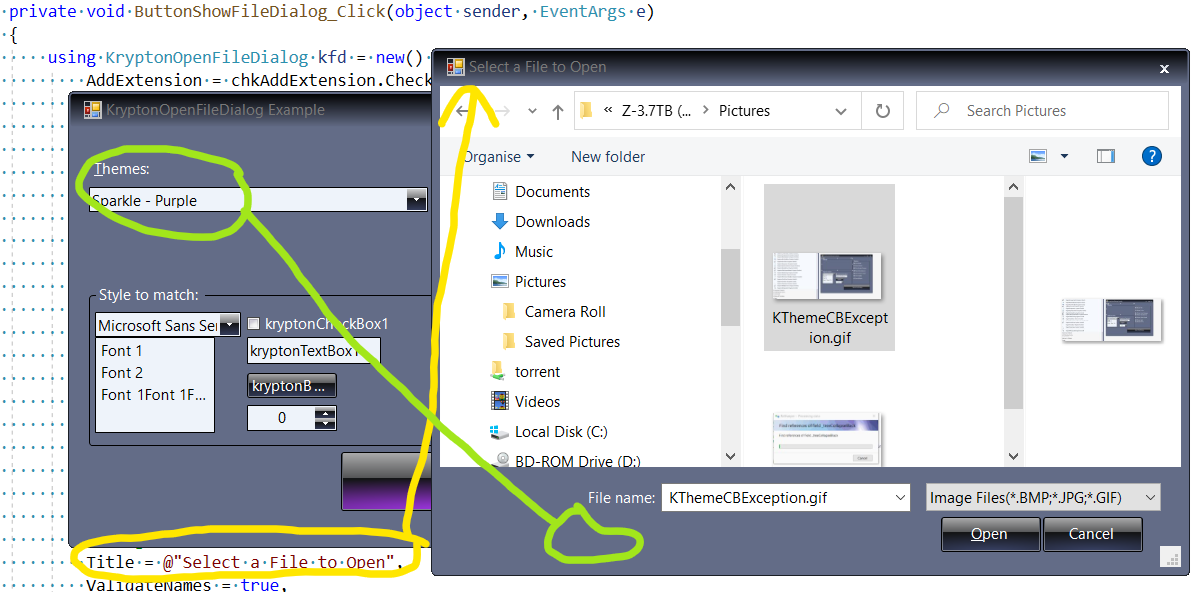
KryptonOpenFileDialog 是增强型打开文件对话框,替代标准 System.Windows.Forms.OpenFileDialog。它自动跟随 Krypton 主题渲染,提供文件浏览、过滤器、多选、初始目录等完整功能。用户选择的文件路径通过 FileName(单选)或 FileNames(多选)属性获取。
常用属性
| 属性 | 类型 | 说明 |
|---|---|---|
FileName | string | 用户选择的文件完整路径(单选) |
FileNames | string[] | 用户选择的多个文件路径(多选时) |
Filter | string | 文件类型过滤器(如 "文本文件|*.txt|所有文件|*.*") |
FilterIndex | int | 默认选中的过滤器索引(从 1 开始) |
InitialDirectory | string | 对话框打开时的初始目录 |
Title | string | 对话框标题栏文字 |
Multiselect | bool | 是否允许选择多个文件 |
CheckFileExists | bool | 是否检查文件必须存在 |
CheckPathExists | bool | 是否检查路径必须存在 |
RestoreDirectory | bool | 关闭时是否恢复应用程序的当前目录 |
ShowReadOnly | bool | 是否显示只读复选框 |
快速上手
基本用法
using Krypton.Toolkit;

// 创建打开文件对话框
var openFileDialog = new KryptonOpenFileDialog();
openFileDialog.Title = "打开文本文件";
openFileDialog.Filter = "文本文件|*.txt|C# 文件|*.cs|所有文件|*.*";
openFileDialog.FilterIndex = 1;
openFileDialog.InitialDirectory = Environment.GetFolderPath(
    Environment.SpecialFolder.MyDocuments);

if (openFileDialog.ShowDialog(this) == DialogResult.OK)
{
    string filePath = openFileDialog.FileName;
    string content = File.ReadAllText(filePath);
    richTextBox.Text = content;
}
多文件选择
var openFileDialog = new KryptonOpenFileDialog();
openFileDialog.Title = "选择图片文件";
openFileDialog.Filter = "图片文件|*.png;*.jpg;*.jpeg;*.bmp;*.gif|所有文件|*.*";
openFileDialog.Multiselect = true;

if (openFileDialog.ShowDialog(this) == DialogResult.OK)
{
    foreach (string file in openFileDialog.FileNames)
    {
        AddImageToList(file);
    }
    lblStatus.Text = $"已选择 {openFileDialog.FileNames.Length} 个文件";
}
进阶用法
项目文件打开(IDE 场景)
// IDE 中打开解决方案/项目文件
var dlg = new KryptonOpenFileDialog();
dlg.Title = "打开项目";
dlg.Filter = "解决方案文件|*.sln|项目文件|*.csproj|所有文件|*.*";
dlg.FilterIndex = 1;
dlg.CheckFileExists = true;
dlg.RestoreDirectory = true;

if (dlg.ShowDialog(this) == DialogResult.OK)
{
    if (dlg.FileName.EndsWith(".sln"))
        OpenSolution(dlg.FileName);
    else if (dlg.FileName.EndsWith(".csproj"))
        OpenProject(dlg.FileName);
}
带文件验证的打开操作
private void OpenConfigFile()
{
    var dlg = new KryptonOpenFileDialog();
    dlg.Title = "打开配置文件";
    dlg.Filter = "JSON 配置|*.json|XML 配置|*.xml|INI 配置|*.ini";
    dlg.InitialDirectory = AppDomain.CurrentDomain.BaseDirectory;

    // 文件确认事件(自定义验证)
    dlg.FileOk += (s, e) =>
    {
        var fileInfo = new FileInfo(dlg.FileName);
        if (fileInfo.Length > 10 * 1024 * 1024)  // 10MB 限制
        {
            KryptonMessageBox.Show(this,
                "配置文件过大(超过 10MB),请选择较小的文件。",
                "文件错误",
                MessageBoxButtons.OK,
                MessageBoxIcon.Warning);
            e.Cancel = true;  // 取消关闭对话框
        }
    };

    if (dlg.ShowDialog(this) == DialogResult.OK)
    {
        LoadConfiguration(dlg.FileName);
    }
}
提示:
Filter 属性的格式为 "描述|扩展名|描述|扩展名",多扩展名用分号分隔(如 "图片|*.png;*.jpg")。设置 RestoreDirectory = true 可避免对话框改变应用程序的工作目录。
对应示例项目
📁 Source/Krypton Toolkit Examples/KryptonOpenFileDialog Examples/
包含:基本文件打开、多选、过滤器、文件验证演示。