KryptonCheckedListBox ✓ LCode 已集成 Toolkit
命名空间:Krypton.Toolkit · 程序集:Krypton.Toolkit.dll
简介
KryptonCheckedListBox 是增强型复选列表框控件,替代标准 System.Windows.Forms.CheckedListBox。每一行都带一个主题化勾选框,用户可以勾选任意多项,适合权限选择、字段挑选、批量开关等「多选多」场景。
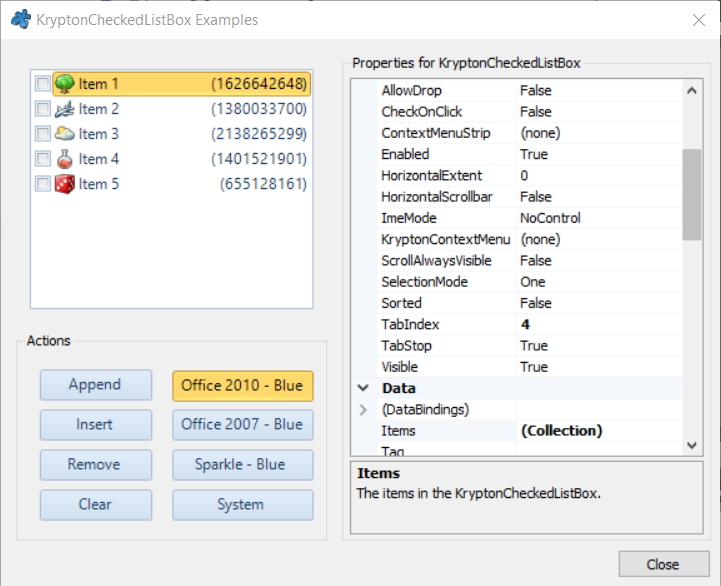
常用属性
| 属性 | 类型 | 说明 |
|---|---|---|
Items | 集合 | 列表项集合 |
CheckedItems | 集合 | 所有已勾选项的集合 |
CheckedIndices | 集合 | 所有已勾选项的索引集合 |
SelectedIndex | int | 当前高亮项索引 |
CheckOnClick | bool | 点击行任意位置即切换勾选(默认 false,需点勾选框) |
ThreeDCheckBoxes | bool | 勾选框是否使用立体样式 |
SelectionMode | SelectionMode | 高亮选择模式(一般为 One 或 None) |
ItemHeight | int | 行高 |
HorizontalScrollbar | bool | 是否显示水平滚动条 |
StateCommon.Item.Back.Color1 | Color | 行背景色 |
常用事件
| 事件 | 说明 |
|---|---|
ItemCheck | 勾选状态即将改变时触发(可在此取消或联动) |
SelectedIndexChanged | 高亮行改变时触发 |
快速上手
基本用法
using Krypton.Toolkit;

var chkList = new KryptonCheckedListBox();
chkList.Location = new Point(16, 16);
chkList.Size = new Size(220, 150);
chkList.CheckOnClick = true;  // 点行即可勾选

chkList.Items.Add("读取", true);    // 添加时指定默认勾选
chkList.Items.Add("写入", false);
chkList.Items.Add("删除", false);
chkList.Items.Add("管理员", false);

this.Controls.Add(chkList);
收集所有勾选项
var selected = new List<string>();
foreach (object item in chkList.CheckedItems)
    selected.Add(item.ToString());

MessageBox.Show($"已勾选 {selected.Count} 项:{string.Join("、", selected)}");
进阶用法
全选 / 全不选
// 全选
for (int i = 0; i < chkList.Items.Count; i++)
    chkList.SetItemChecked(i, true);

// 全不选
for (int i = 0; i < chkList.Items.Count; i++)
    chkList.SetItemChecked(i, false);

// 按索引单独设置
chkList.SetItemChecked(3, true);
勾选联动(勾选「管理员」自动勾选其余项)
chkList.ItemCheck += (s, e) =>
{
    if (chkList.Items[e.Index].ToString() == "管理员")
    {
        bool check = e.NewValue == CheckState.Checked;
        for (int i = 0; i < chkList.Items.Count; i++)
            if (i != e.Index)
                chkList.SetItemChecked(i, check);
    }
};
提示:
ItemCheck 事件触发时 CheckedItems 尚未更新,需要最新状态请读取 e.NewValue,或在事件后异步读取。
对应示例项目
📁 Source/Krypton Toolkit Examples/KryptonCheckedListBox Examples/
包含:勾选收集、全选/反选、ItemCheck 联动演示。