KryptonContextMenu ✓ LCode 已集成 Toolkit
命名空间:Krypton.Toolkit · 程序集:Krypton.Toolkit.dll
简介
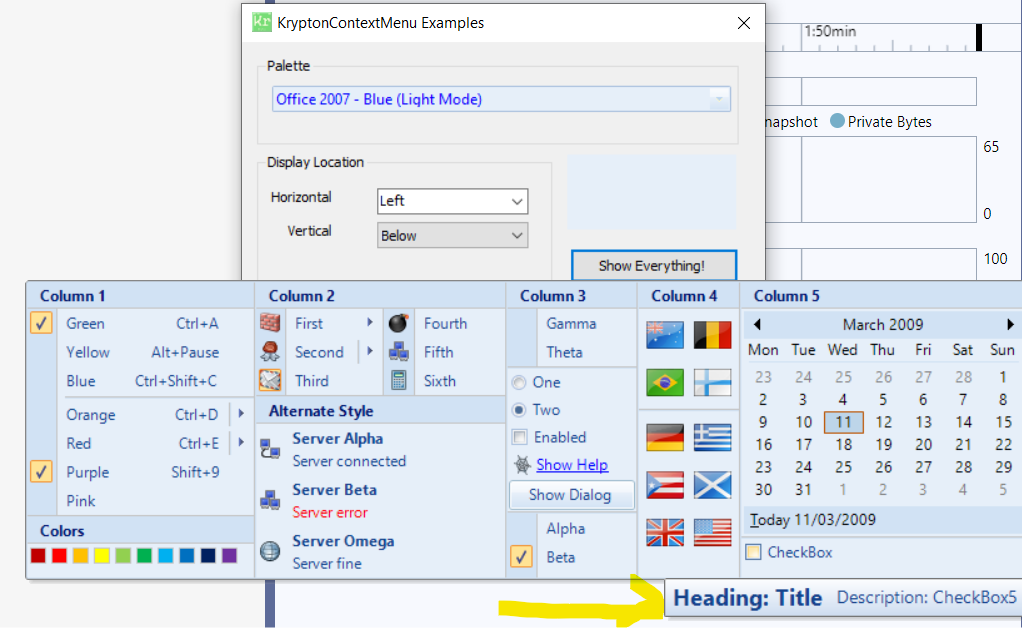
KryptonContextMenu 是增强型右键菜单组件,替代标准 System.Windows.Forms.ContextMenuStrip。它自动跟随 Krypton 主题渲染,支持菜单项、复选项、分隔线、子菜单、标题栏、图片列等丰富元素,可关联到任意控件的右键弹出,也可作为 KryptonButton 的下拉内容。
常用属性
| 属性 | 类型 | 说明 |
|---|---|---|
Items | 集合 | 菜单项集合(KryptonContextMenuItem / Separator / Header 等) |
KryptonContextMenuItems | 集合 | 顶层菜单元素集合 |
ShowImageMargin | bool | 是否显示左侧图片列区域 |
ShowCheckMargin | bool | 是否显示复选标记列 |
StateCommon.Back.Color1 | Color | 菜单背景色 |
StateCommon.Border.Color1 | Color | 菜单边框颜色 |
StateCommon.ShortText.Font | Font | 菜单项文字字体 |
StateCommon.ShortText.Color1 | Color | 菜单项文字颜色 |
StateHighlight.ShortText.Color1 | Color | 高亮(悬停)时文字颜色 |
StateHighlight.Back.Color1 | Color | 高亮时背景色 |
快速上手
基本右键菜单
using Krypton.Toolkit;

// 创建右键菜单
var contextMenu = new KryptonContextMenu();

// 添加菜单项
var itemCut = new KryptonContextMenuItem("剪切");
itemCut.Image = Properties.Resources.icon_cut;
itemCut.Click += (s, e) => textBox.Cut();

var itemCopy = new KryptonContextMenuItem("复制");
itemCopy.Image = Properties.Resources.icon_copy;
itemCopy.Click += (s, e) => textBox.Copy();

var itemPaste = new KryptonContextMenuItem("粘贴");
itemPaste.Image = Properties.Resources.icon_paste;
itemPaste.Click += (s, e) => textBox.Paste();

contextMenu.Items.Add(itemCut);
contextMenu.Items.Add(itemCopy);
contextMenu.Items.Add(itemPaste);
contextMenu.Items.Add(new KryptonContextMenuSeparator());
contextMenu.Items.Add(new KryptonContextMenuItem("全选"));

// 关联到控件
textBox.KryptonContextMenu = contextMenu;
带子菜单的右键菜单
var contextMenu = new KryptonContextMenu();

// 创建子菜单
var subMenu = new KryptonContextMenuItem("导出为");
subMenu.Items.Add(new KryptonContextMenuItem("PDF 格式"));
subMenu.Items.Add(new KryptonContextMenuItem("Excel 格式"));
subMenu.Items.Add(new KryptonContextMenuItem("Word 格式"));

contextMenu.Items.Add(new KryptonContextMenuItem("新建"));
contextMenu.Items.Add(new KryptonContextMenuItem("打开"));
contextMenu.Items.Add(new KryptonContextMenuSeparator());
contextMenu.Items.Add(subMenu);

this.KryptonContextMenu = contextMenu;
进阶用法
带标题和复选项的菜单
var contextMenu = new KryptonContextMenu();

// 添加标题栏
var header = new KryptonContextMenuHeader("编辑操作");
contextMenu.Items.Add(header);
contextMenu.Items.Add(new KryptonContextMenuSeparator());

// 添加复选菜单项
var chkWordWrap = new KryptonContextMenuCheckBox("自动换行");
chkWordWrap.Checked = true;
chkWordWrap.CheckedChanged += (s, e) =>
{
    textBox.WordWrap = chkWordWrap.Checked;
};

// 添加单选菜单项组
var radioSmall = new KryptonContextMenuRadioButton("小字体");
var radioMedium = new KryptonContextMenuRadioButton("中字体");
var radioLarge = new KryptonContextMenuRadioButton("大字体");
radioMedium.Checked = true;

contextMenu.Items.Add(chkWordWrap);
contextMenu.Items.Add(new KryptonContextMenuSeparator());
contextMenu.Items.Add(radioSmall);
contextMenu.Items.Add(radioMedium);
contextMenu.Items.Add(radioLarge);
动态构建菜单(根据选中内容)
// 在弹出前动态调整菜单项
contextMenu.Opening += (s, e) =>
{
    bool hasSelection = textBox.SelectionLength > 0;
    itemCut.Enabled = hasSelection;
    itemCopy.Enabled = hasSelection;
    itemPaste.Enabled = Clipboard.ContainsText();
};
提示:KryptonContextMenu 可同时关联多个控件。将同一菜单实例赋给多个控件的
KryptonContextMenu 属性即可共享菜单。
对应示例项目
📁 Source/Krypton Toolkit Examples/KryptonContextMenu Examples/
包含:基本右键菜单、子菜单、复选/单选项、动态菜单演示。