KryptonMaskedTextBox ✓ LCode 已集成 Toolkit
命名空间:Krypton.Toolkit · 程序集:Krypton.Toolkit.dll
简介
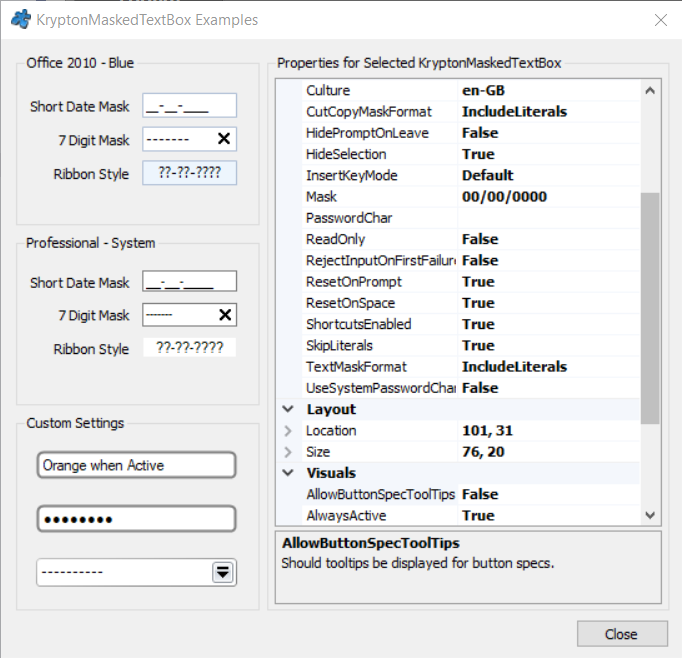
KryptonMaskedTextBox 是增强型掩码文本框,替代标准 MaskedTextBox。它通过掩码字符串约束用户输入格式(如电话号码、日期、邮编),同时自动跟随 Krypton 主题渲染,支持 ButtonSpec 附加按钮和状态外观自定义。
常用属性
| 属性 | 类型 | 说明 |
|---|---|---|
Mask | string | 掩码字符串(如 "000-0000-0000"、"00/00/0000") |
Text | string | 当前文本内容 |
PromptChar | char | 占位提示字符(默认 '_') |
TextMaskFormat | MaskFormat | 获取 Text 时是否包含提示符和字面量 |
ValidatingType | Type | 验证类型(如 typeof(int)、typeof(DateTime)) |
AllowPromptAsInput | bool | 是否允许将提示符作为有效输入 |
HidePromptOnLeave | bool | 失去焦点时是否隐藏提示符 |
BeepOnError | bool | 输入无效字符时是否发出提示音 |
ButtonSpecs | 集合 | 附加的 ButtonSpec 按钮集合 |
StateCommon.Back.Color1 | Color | 所有状态下的背景色 |
快速上手
电话号码输入
using Krypton.Toolkit;

var txtPhone = new KryptonMaskedTextBox();
txtPhone.Mask = "000-0000-0000";  // 手机号格式
txtPhone.PromptChar = '_';
txtPhone.Location = new Point(20, 20);
txtPhone.Size = new Size(180, 28);
this.Controls.Add(txtPhone);

// 获取输入值
string phone = txtPhone.Text;  // 例如 "138-1234-5678"
日期输入
var txtDate = new KryptonMaskedTextBox();
txtDate.Mask = "00/00/0000";
txtDate.ValidatingType = typeof(DateTime);
txtDate.TextMaskFormat = MaskFormat.ExcludePromptAndLiterals;

txtDate.TypeValidationCompleted += (s, e) => {
    if (!e.IsValidInput)
        KryptonMessageBox.Show("日期格式无效", "验证失败");
};
进阶用法
自定义掩码字符说明
| 掩码字符 | 含义 |
|---|---|
0 | 数字(必填) |
9 | 数字或空格(可选) |
L | 字母(必填) |
A | 字母或数字(必填) |
C | 任意字符(可选) |
添加清除按钮(ButtonSpec)
var specClear = new ButtonSpecAny();
specClear.Type = PaletteButtonSpecStyle.Close;
specClear.Edge = PaletteRelativeEdgeAlign.Far;
specClear.Click += (s, e) => txtPhone.Clear();
txtPhone.ButtonSpecs.Add(specClear);
提示:在 LCode 设计器中,属性面板的
Mask 属性支持可视化编辑——点击右侧 "..." 按钮可打开掩码编辑向导。
对应示例项目
📁 Source/Krypton Toolkit Examples/KryptonMaskedTextBox Examples/