KryptonFontDialog ✓ LCode 已集成 对话框
命名空间:Krypton.Toolkit · 程序集:Krypton.Toolkit.dll
简介
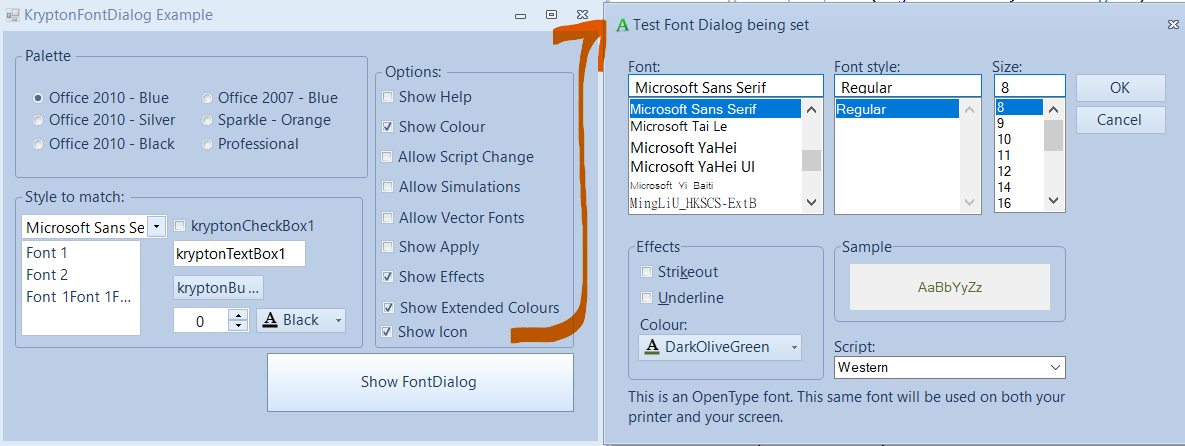
KryptonFontDialog 是增强型字体选择对话框,替代标准 System.Windows.Forms.FontDialog。它自动跟随 Krypton 主题渲染,提供字体族、字形、大小、颜色、效果(删除线/下划线)等完整选择功能,用户选择的字体通过 Font 属性获取,颜色通过 Color 属性获取。
常用属性
| 属性 | 类型 | 说明 |
|---|---|---|
Font | Font | 用户选择的字体(对话框关闭后读取) |
Color | Color | 用户选择的字体颜色(需 ShowColor = true) |
ShowColor | bool | 是否显示颜色选择下拉框 |
ShowEffects | bool | 是否显示效果选项(删除线、下划线) |
ShowApply | bool | 是否显示"应用"按钮 |
ShowHelp | bool | 是否显示帮助按钮 |
FontMustExist | bool | 是否要求用户必须选择已存在的字体 |
MinSize | int | 允许选择的最小字号 |
MaxSize | int | 允许选择的最大字号 |
AllowVectorFonts | bool | 是否允许选择矢量字体 |
快速上手
基本用法
using Krypton.Toolkit;

// 创建字体对话框
var fontDialog = new KryptonFontDialog();
fontDialog.Font = richTextBox.SelectionFont ?? richTextBox.Font;
fontDialog.ShowColor = true;
fontDialog.ShowEffects = true;

if (fontDialog.ShowDialog(this) == DialogResult.OK)
{
    // 应用字体到选中文字
    richTextBox.SelectionFont = fontDialog.Font;
    richTextBox.SelectionColor = fontDialog.Color;
}
设置控件字体
var fontDialog = new KryptonFontDialog();
fontDialog.Font = lblTitle.Font;
fontDialog.MinSize = 8;
fontDialog.MaxSize = 72;

if (fontDialog.ShowDialog() == DialogResult.OK)
{
    lblTitle.Font = fontDialog.Font;
}
进阶用法
文本编辑器字体工具栏
// 工具栏字体按钮
var btnFont = new ToolStripButton("字体...");
btnFont.Image = Properties.Resources.icon_font;
btnFont.Click += (s, e) =>
{
    var dlg = new KryptonFontDialog();
    dlg.ShowColor = true;
    dlg.ShowEffects = true;
    dlg.ShowApply = true;
    dlg.Font = richTextBox.SelectionFont ?? richTextBox.Font;

    // "应用"按钮事件(实时预览)
    dlg.Apply += (sender, args) =>
    {
        richTextBox.SelectionFont = dlg.Font;
        richTextBox.SelectionColor = dlg.Color;
    };

    if (dlg.ShowDialog(this) == DialogResult.OK)
    {
        richTextBox.SelectionFont = dlg.Font;
        richTextBox.SelectionColor = dlg.Color;
    }
};
全局字体设置
// 应用设置中的全局字体配置
private void btnChangeFont_Click(object sender, EventArgs e)
{
    var dlg = new KryptonFontDialog();
    dlg.Font = Properties.Settings.Default.EditorFont;
    dlg.MinSize = 9;
    dlg.MaxSize = 36;
    dlg.FontMustExist = true;

    if (dlg.ShowDialog(this) == DialogResult.OK)
    {
        Properties.Settings.Default.EditorFont = dlg.Font;
        Properties.Settings.Default.Save();

        // 应用到所有编辑器
        ApplyEditorFont(dlg.Font);
    }
}
提示:设置
ShowApply = true 后,用户可在不关闭对话框的情况下实时预览字体效果。配合 Apply 事件可实现"所见即所得"的字体选择体验。
对应示例项目
📁 Source/Krypton Toolkit Examples/KryptonFontDialog Examples/
包含:基本字体选择、颜色+效果、实时预览、全局字体设置演示。