KryptonDomainUpDown ✓ LCode 已集成 Toolkit
命名空间:Krypton.Toolkit · 程序集:Krypton.Toolkit.dll
简介
KryptonDomainUpDown 是增强型域微调框控件,替代标准 System.Windows.Forms.DomainUpDown。它通过上下箭头在一组预定义文本项之间循环切换(如「高 / 中 / 低」「省份 / 城市」),与 KryptonNumericUpDown 的区别在于它处理的是文本列表而非数值,适合有限枚举值的快速切换录入。
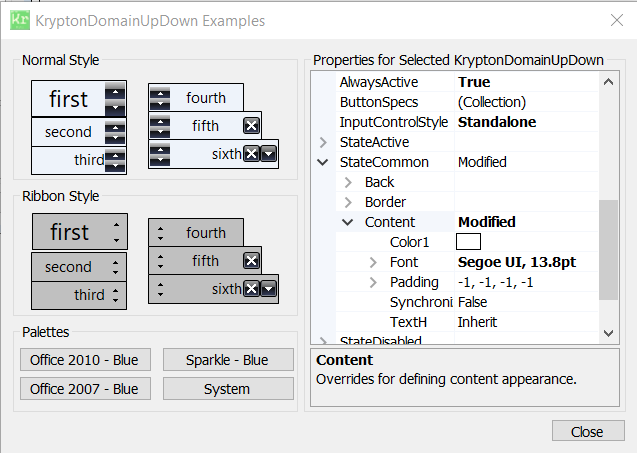
常用属性
| 属性 | 类型 | 说明 |
|---|---|---|
Items | 集合 | 文本项列表(循环切换的域) |
Text | string | 当前显示的文本 |
SelectedIndex | int | 当前选中项索引(-1 表示未选中) |
SelectedItem | object | 当前选中项对象 |
Wrap | bool | 到达列表末端后是否循环回开头 |
Sorted | bool | Items 是否自动排序 |
ReadOnly | bool | 是否只读(仅能用箭头切换) |
UpDownAlign | LeftRightAlignment | 箭头按钮位置(Left / Right) |
InterceptArrowKeys | bool | 方向键 ↑↓ 是否切换项 |
StateCommon.Content.Color1 | Color | 文本颜色 |
StateCommon.Border.Color1 | Color | 边框颜色 |
快速上手
基本用法
using Krypton.Toolkit;

var domPriority = new KryptonDomainUpDown();
domPriority.Location = new Point(16, 16);
domPriority.Size = new Size(120, 26);

// 填充文本列表
domPriority.Items.Add("低");
domPriority.Items.Add("中");
domPriority.Items.Add("高");
domPriority.SelectedIndex = 1;  // 默认「中」

// 切换事件
domPriority.SelectedItemChanged += (s, e) =>
    Console.WriteLine($"优先级:{domPriority.Text}");

this.Controls.Add(domPriority);
循环切换
// 到达末端后自动回到开头(默认 false)
domPriority.Wrap = true;

// 程序化切换
domPriority.UpButton();    // 下一项
domPriority.DownButton();  // 上一项
进阶用法
绑定枚举值
// 用枚举名称填充
foreach (string name in Enum.GetNames(typeof(OrderStatus)))
    domStatus.Items.Add(name);

domStatus.SelectedIndex = 0;

// 读取时还原为枚举
var status = (OrderStatus)Enum.Parse(
    typeof(OrderStatus), domStatus.Text);
允许手动输入并自动匹配
domPriority.ReadOnly = false;  // 允许直接输入

// 用户输入后校验是否在列表中
domPriority.TextChanged += (s, e) =>
{
    if (!domPriority.Items.Contains(domPriority.Text))
        domPriority.StateCommon.Border.Color1 = Color.Red;  // 提示非法
    else
        domPriority.StateCommon.Border.Color1 = Color.Empty;  // 恢复主题色
};
提示:选项较多或需要下拉浏览时,请改用 KryptonComboBox;DomainUpDown 最适合 3~8 个固定选项的快速循环切换。
对应示例项目
📁 Source/Krypton Toolkit Examples/KryptonDomainUpDown Examples/
包含:文本循环切换、Wrap 循环、枚举绑定演示。