KryptonStatusStrip ✓ LCode 已集成 Toolkit
命名空间:Krypton.Toolkit · 程序集:Krypton.Toolkit.dll
简介
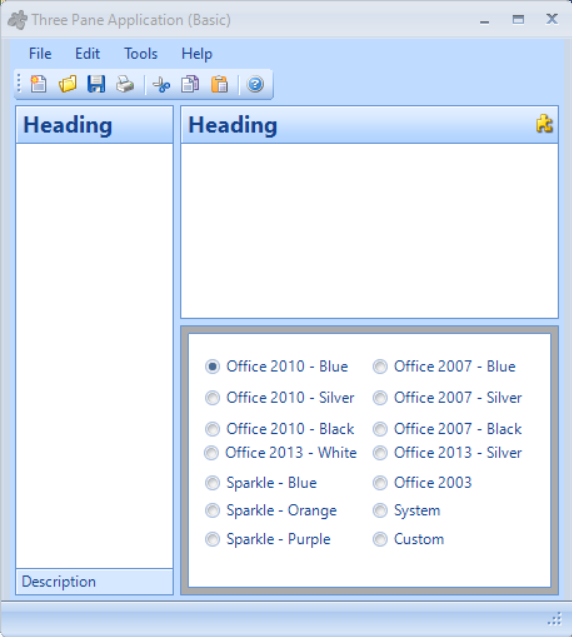
KryptonStatusStrip 是增强型状态栏控件,替代标准 System.Windows.Forms.StatusStrip。它自动跟随 Krypton 主题渲染,通常停靠在窗体底部,用于显示状态信息、进度条、操作提示等。支持标签、按钮、下拉按钮、进度条、分隔线等多种子项类型。
常用属性
| 属性 | 类型 | 说明 |
|---|---|---|
Items | 集合 | 状态栏子项集合(Label / Button / ProgressBar / Separator 等) |
Dock | DockStyle | 停靠方式(默认 Bottom) |
SizingGrip | bool | 是否显示右下角的拖拽调整手柄 |
RenderMode | ToolStripRenderMode | 渲染模式(通常由 Krypton 主题接管) |
StateCommon.Back.Color1 | Color | 状态栏背景色 |
StateCommon.Back.Color2 | Color | 状态栏渐变次颜色 |
StateCommon.Border.Color1 | Color | 状态栏顶部边框颜色 |
Font | Font | 状态栏文字字体 |
LayoutStyle | ToolStripLayoutStyle | 子项布局方式(HorizontalStackWithOverflow 等) |
Stretch | bool | 是否拉伸填满父容器宽度 |
快速上手
基本状态栏
using Krypton.Toolkit;

// 创建状态栏
var statusStrip = new KryptonStatusStrip();
statusStrip.Dock = DockStyle.Bottom;

// 添加状态标签
var lblStatus = new ToolStripStatusLabel("就绪");
lblStatus.Spring = true;          // 占据剩余空间
lblStatus.TextAlign = ContentAlignment.MiddleLeft;

// 添加进度条
var progressBar = new ToolStripProgressBar();
progressBar.Minimum = 0;
progressBar.Maximum = 100;
progressBar.Value = 0;
progressBar.Visible = false;

// 添加行/列信息标签
var lblPosition = new ToolStripStatusLabel("行 1, 列 1");

statusStrip.Items.Add(lblStatus);
statusStrip.Items.Add(progressBar);
statusStrip.Items.Add(lblPosition);

this.Controls.Add(statusStrip);
更新状态信息
// 在操作过程中更新状态栏
private void StartOperation()
{
    lblStatus.Text = "正在处理...";
    progressBar.Visible = true;
    progressBar.Value = 0;
}

private void UpdateProgress(int percent)
{
    progressBar.Value = percent;
    lblStatus.Text = $"正在处理... {percent}%";
}

private void CompleteOperation()
{
    progressBar.Visible = false;
    lblStatus.Text = "操作完成";
}
进阶用法
多区域状态栏(IDE 风格)
var statusStrip = new KryptonStatusStrip();
statusStrip.Dock = DockStyle.Bottom;

// 左侧:状态消息(弹性占满)
var lblMessage = new ToolStripStatusLabel("就绪");
lblMessage.Spring = true;
lblMessage.TextAlign = ContentAlignment.MiddleLeft;

// 中间:编码信息
var lblEncoding = new ToolStripStatusLabel("UTF-8");

// 右侧:行列信息
var lblCursor = new ToolStripStatusLabel("行 1, 列 1");

// 最右:缩放比例
var lblZoom = new ToolStripStatusLabel("100%");

statusStrip.Items.AddRange(new ToolStripItem[]
{
    lblMessage,
    new ToolStripSeparator(),
    lblEncoding,
    new ToolStripSeparator(),
    lblCursor,
    new ToolStripSeparator(),
    lblZoom
});

this.Controls.Add(statusStrip);
带按钮的状态栏
// 在状态栏中添加可点击的按钮
var btnNotifications = new ToolStripButton("🔔 3 条通知");
btnNotifications.Click += (s, e) => ShowNotificationPanel();

var btnConnection = new ToolStripButton("● 已连接");
btnConnection.ForeColor = Color.Green;
btnConnection.Click += (s, e) => ToggleConnection();

statusStrip.Items.Add(btnNotifications);
statusStrip.Items.Add(btnConnection);
提示:设置
ToolStripStatusLabel.Spring = true 可让该标签占据状态栏的所有剩余空间,其他项靠右排列,这是 IDE 风格状态栏的常用布局方式。
对应示例项目
📁 Source/Krypton Toolkit Examples/KryptonStatusStrip Examples/
包含:基本状态栏、进度条联动、多区域布局、按钮交互演示。