KryptonRichTextBox ✓ LCode 已集成 Toolkit
命名空间:Krypton.Toolkit · 程序集:Krypton.Toolkit.dll
简介
KryptonRichTextBox 是增强型富文本编辑控件,替代标准 RichTextBox。支持 RTF 格式文本、字体/颜色/段落样式设置,同时自动跟随 Krypton 主题渲染边框和背景。适用于需要格式化文本编辑的场景(如备注、日志查看器)。
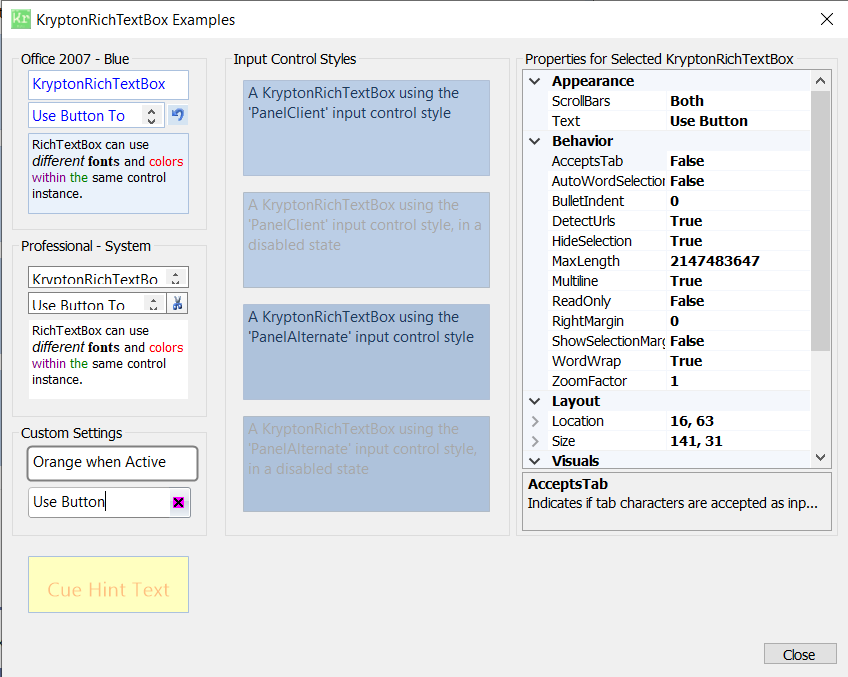
常用属性
| 属性 | 类型 | 说明 |
|---|---|---|
Text | string | 纯文本内容 |
Rtf | string | RTF 格式文本内容 |
ReadOnly | bool | 是否只读 |
WordWrap | bool | 是否自动换行 |
ScrollBars | RichTextBoxScrollBars | 滚动条显示方式 |
SelectionFont | Font | 当前选区的字体 |
SelectionColor | Color | 当前选区的文字颜色 |
SelectionAlignment | HorizontalAlignment | 当前选区的段落对齐 |
DetectUrls | bool | 是否自动检测并高亮 URL |
StateCommon.Back.Color1 | Color | 编辑区背景色 |
快速上手
基本富文本编辑
using Krypton.Toolkit;

var rtb = new KryptonRichTextBox();
rtb.Dock = DockStyle.Fill;
rtb.ScrollBars = RichTextBoxScrollBars.Vertical;
rtb.WordWrap = true;
this.Controls.Add(rtb);

// 设置选区格式
rtb.AppendText("标题文字\n");
rtb.Select(0, 4);
rtb.SelectionFont = new Font("微软雅黑", 16, FontStyle.Bold);
rtb.SelectionColor = Color.FromArgb(15, 118, 110);
加载和保存 RTF 文件
// 加载 RTF 文件
rtb.LoadFile(@"C:\docs\notes.rtf", RichTextBoxStreamType.RichText);

// 保存为 RTF
rtb.SaveFile(@"C:\docs\notes_new.rtf", RichTextBoxStreamType.RichText);

// 保存为纯文本
rtb.SaveFile(@"C:\docs\notes.txt", RichTextBoxStreamType.PlainText);
进阶用法
简易工具栏配合
// 加粗按钮
btnBold.Click += (s, e) => {
    var f = rtb.SelectionFont;
    rtb.SelectionFont = new Font(f, f.Style ^ FontStyle.Bold);
};

// 颜色按钮
btnColor.Click += (s, e) => {
    using (var dlg = new KryptonColorDialog()) {
        if (dlg.ShowDialog() == DialogResult.OK)
            rtb.SelectionColor = dlg.Color;
    }
};
提示:如果只需要纯文本编辑,使用 KryptonTextBox 更轻量。KryptonRichTextBox 适用于需要字体/颜色/段落格式的场景。
对应示例项目
📁 Source/Krypton Toolkit Examples/KryptonRichTextBox Examples/