KryptonListBox ✓ LCode 已集成 Toolkit
命名空间:Krypton.Toolkit · 程序集:Krypton.Toolkit.dll
简介
KryptonListBox 是增强型列表框控件,替代标准 System.Windows.Forms.ListBox。它以 Krypton 主题风格渲染列表项的选中、悬停状态,支持单选/多选、项高度自定义、水平滚动条以及数据绑定,适合展示一组可选文本项。
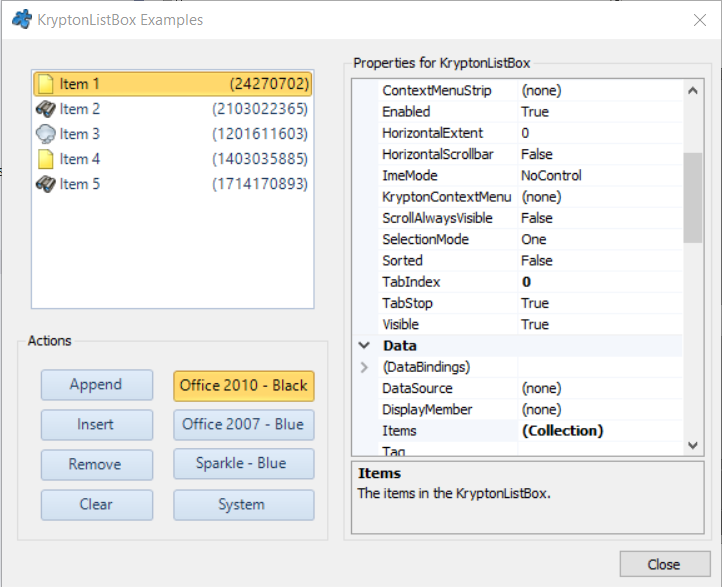
常用属性
| 属性 | 类型 | 说明 |
|---|---|---|
Items | 集合 | 列表项集合(字符串或对象) |
SelectedIndex | int | 当前选中项索引(-1 表示未选中) |
SelectedItem | object | 当前选中项对象 |
SelectedValue | object | 绑定数据源时的选中值 |
SelectionMode | SelectionMode | 选择模式(One / MultiSimple / MultiExtended / None) |
SelectedIndices | 集合 | 多选模式下所有选中项索引 |
ItemHeight | int | 列表项高度(DrawMode 为 OwnerDraw 时生效) |
HorizontalScrollbar | bool | 是否显示水平滚动条 |
DataSource | object | 数据源(DataTable / List 等) |
DisplayMember | string | 数据源中用于显示的字段名 |
ValueMember | string | 数据源中用于取值的字段名 |
StateCommon.Item.Back.Color1 | Color | 列表项背景色 |
快速上手
基本用法
using Krypton.Toolkit;

var listBox = new KryptonListBox();
listBox.Location = new Point(16, 16);
listBox.Size = new Size(200, 160);

// 添加列表项
listBox.Items.Add("北京");
listBox.Items.Add("上海");
listBox.Items.Add("广州");
listBox.Items.Add("深圳");

// 默认选中第一项
listBox.SelectedIndex = 0;

// 选中项改变事件
listBox.SelectedIndexChanged += (s, e) =>
    MessageBox.Show($"选中:{listBox.SelectedItem}");

this.Controls.Add(listBox);
多选模式
listBox.SelectionMode = SelectionMode.MultiExtended;

// 遍历所有选中项
foreach (int idx in listBox.SelectedIndices)
    Console.WriteLine(listBox.Items[idx]);
进阶用法
数据绑定
var cities = new List<City>
{
    new City { Id = 1, Name = "北京" },
    new City { Id = 2, Name = "上海" },
};

listBox.DataSource = cities;
listBox.DisplayMember = "Name";   // 显示名称
listBox.ValueMember = "Id";       // 取值 Id

listBox.SelectedValueChanged += (s, e) =>
    Console.WriteLine($"选中城市 Id:{listBox.SelectedValue}");
自定义选中项外观
// 选中项背景使用主题绿
listBox.StateCommon.Item.Back.Color1 = Color.FromArgb(204, 251, 241);
listBox.StateCommon.Item.Content.ShortText.Color1 = Color.FromArgb(15, 118, 110);

// 悬停项背景
listBox.StateTracking.Item.Back.Color1 = Color.FromArgb(240, 253, 244);
提示:若需要每行带勾选框,请改用 KryptonCheckedListBox;若需要多列与表头,请使用 KryptonListView。
对应示例项目
📁 Source/Krypton Toolkit Examples/KryptonListBox Examples/
包含:单选/多选演示、数据绑定、项外观自定义。