KryptonTextBox ✓ LCode 已集成 Toolkit
命名空间:Krypton.Toolkit · 程序集:Krypton.Toolkit.dll
简介
KryptonTextBox 是增强型文本框控件,替代标准 System.Windows.Forms.TextBox。它跟随 Krypton 主题渲染边框与背景,支持水印提示文字(Hint)、ButtonSpec 附加按钮(如清除按钮、搜索按钮)、多行输入和密码模式。是表单输入场景的核心控件。
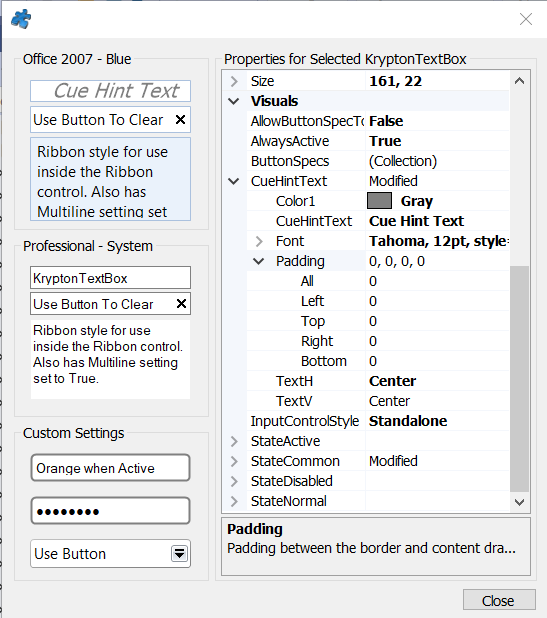
常用属性
| 属性 | 类型 | 说明 |
|---|---|---|
Text | string | 文本框内容 |
Hint | string | 水印提示文字(为空时显示的灰色提示) |
Multiline | bool | 是否允许多行输入 |
PasswordChar | char | 密码掩码字符(如 '*') |
UseSystemPasswordChar | bool | 使用系统默认密码字符 |
MaxLength | int | 最大输入长度 |
ReadOnly | bool | 是否只读 |
StateCommon.Content.Font | Font | 输入文字字体 |
StateCommon.Border.Color1 | Color | 边框颜色 |
StateActive.Border.Color1 | Color | 获得焦点时边框颜色 |
ButtonSpecs | 集合 | 附加按钮集合(清除、搜索等) |
AcceptsReturn | bool | 多行时是否接受回车换行 |
快速上手
基本用法(带水印的输入框)
using Krypton.Toolkit;

// 创建文本框
var txtSearch = new KryptonTextBox();
txtSearch.Hint = "输入关键词搜索…";
txtSearch.Location = new Point(20, 20);
txtSearch.Size = new Size(250, 25);

// 文本变化事件
txtSearch.TextChanged += (s, e) =>
{
    FilterResults(txtSearch.Text);
};

this.Controls.Add(txtSearch);
密码输入框
var txtPwd = new KryptonTextBox();
txtPwd.Hint = "请输入密码";
txtPwd.UseSystemPasswordChar = true;
txtPwd.MaxLength = 32;
txtPwd.Location = new Point(20, 60);
txtPwd.Size = new Size(250, 25);
进阶用法
添加清除按钮(ButtonSpec)
// 在文本框右侧添加清除按钮
var specClear = new ButtonSpecAny();
specClear.Type = PaletteButtonSpecStyle.Close;
specClear.ToolTipBody = "清空内容";
specClear.Edge = PaletteRelativeEdgeAlign.Near; // 靠右显示
specClear.Click += (s, e) =>
{
    txtSearch.Text = string.Empty;
    txtSearch.Focus();
};

txtSearch.ButtonSpecs.Add(specClear);

// 根据是否有内容控制按钮可见性
txtSearch.TextChanged += (s, e) =>
{
    specClear.Visible = string.IsNullOrEmpty(txtSearch.Text)
        ? ButtonSpecVisibility.False
        : ButtonSpecVisibility.True;
};
多行文本框与自定义外观
// 多行备注输入
var txtRemark = new KryptonTextBox();
txtRemark.Multiline = true;
txtRemark.AcceptsReturn = true;
txtRemark.ScrollBars = ScrollBars.Vertical;
txtRemark.Hint = "请输入备注信息(可选)";
txtRemark.Size = new Size(400, 100);

// 获得焦点时高亮边框(翡翠绿)
txtRemark.StateActive.Border.Color1 = Color.FromArgb(15, 118, 110);
txtRemark.StateActive.Border.Color2 = Color.FromArgb(13, 148, 136);
txtRemark.StateActive.Border.Width = 2;
提示:在 LCode 设计器中,
Hint 属性可直接在属性面板设置水印文字。ButtonSpec 集合可通过属性面板的省略号按钮可视化编辑。若水印不显示,请确认控件 Text 为空。
对应示例项目
📁 Source/Krypton Toolkit Examples/KryptonTextBox Examples/
包含:水印提示、密码框、清除按钮、多行输入、自定义边框演示。